Microsoft Changes

Last Updated: February 23rd, 2026
Microsoft has introduced a significant update to how CSP subscriptions behave after their term ends: Extended Service Terms (EST). This change replaces the traditional free “grace period” model and introduces new billing, operational, and customer-experience implications that every CSP partner must understand.
This blog breaks down:
- What EST is
- Why Microsoft is introducing it
- What changes partners must prepare for
- How Work 365 helps automate and simplify everything
What Are Extended Service Terms (EST)?
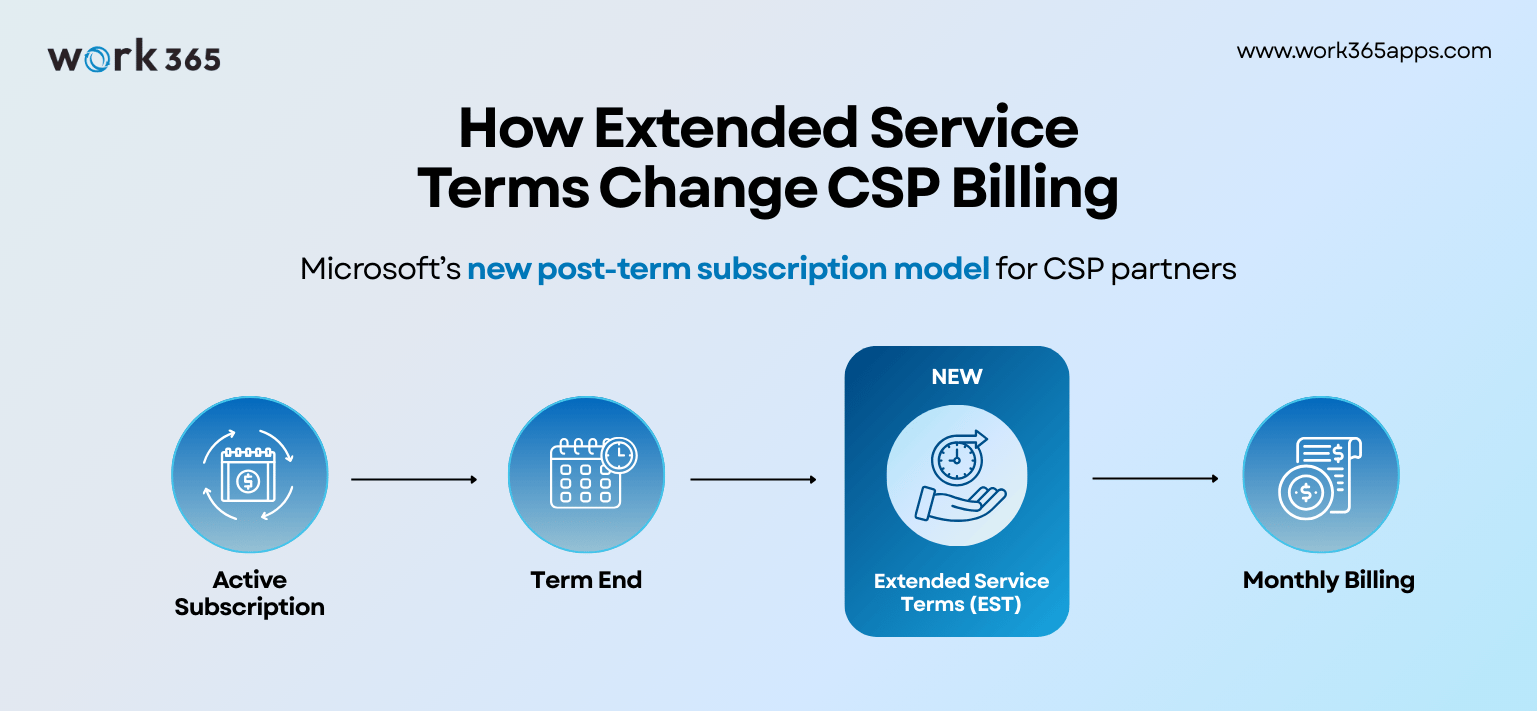
Extended Service Terms (EST) are a paid extension period that begins when a CSP subscription reaches the end of its committed term and the customer has not renewed, changed terms, or cancelled.
EST applies when:
- A CSP subscription reaches its end date
- Auto-renew is OFF
- The customer has not renewed or cancelled
Under EST:
- The customer continues to access the service after the subscription expires.
- Billing becomes monthly, even if the original term was annual or multi-year.
- The subscription is billed at the standard monthly price + 3% uplift (Microsoft notes certain SKUs may have higher uplifts if monthly equivalents don’t exist).
- Partners now have three explicit end-of-term actions:
- Renew (same SKU or alternate modern SKU)
- Cancel at end of term (service stops immediately)
- Move to Extended Service Terms
This is a major shift: Microsoft is ending free post-term continuity and moving toward a formal, billed extension mechanism.
Important: For EST-eligible subscriptions, “auto-renew off” should be treated as ‘moves to EST’ unless you explicitly choose Renew or Cancel at expiration. If no action is taken, eligible subscriptions move to EST.
Official Microsoft source:
Use Extended Service Terms (EST) for Cloud Solution Provider (CSP) subscriptions – Microsoft Learn.
Why Did Microsoft Introduce EST?
According to Microsoft’s Partner Center documentation and recent Tech Community updates, EST is being introduced to:
- Bring CSP billing behavior closer to modern SaaS commercial models
- Reduce 'accidental free usage' during grace periods
- Standardize renewal/cancellation behavior globally
- Improve predictability and compliance in subscription lifecycle management
Changes roll out in phases:
- Nov 2025: EST available in Partner Center sandbox for testing
- Jan 2026: End-of-term options (Renew / Cancel / EST) rollout in production
- Feb 16, 2026: Production availability for UX/API end-of-term paths
- Apr 1, 2026: Free grace period discontinued for most new-commerce subscriptions (no more valid)
- May 4, 2026: Enforcement begins
Note: Microsoft extended enforcement from April 1 to May 4 due to production availability shifting to Feb 16.
This is not optional; all partners must adopt EST workflows. This shift makes renewal accuracy and billing automation essential for CSP partners.
What EST Means for CSP Partners (and MSPs)
EST introduces new rules that impact CSP renewals, customer communication, billing, operations, and compliance. Here’s what partners need to know.
1. No More Free Grace Period After Subscription Expiry
Historically, customers continued to use services for free right after a subscription expired.
EST eliminates this.
If the customer doesn’t act, the subscription automatically moves into EST, and partners must bill accordingly.
This increases risk of:
- Missed renewals
- Customer disputes
- Manual billing errors
2. Billing in EST Is Monthly + 3% Uplift
Even if the original subscription was annual, once it enters EST, Microsoft bills partners monthly with the uplift.
Partners must:
- Charge customers accurately
- Manage proration
- Avoid revenue leakage
3. Partners Must Track New End-of-Term Options
CSP subscriptions now have three possible end-of-term outcomes:
- Renew subscription (same or replacement SKU)
- Cancel at end of term (service stops immediately)
- Move to Extended Service Terms (EST)
This new logic must be managed consistently and accurately.
4. Customer Communication Becomes More Critical
EST billing may surprise customers who expect the old grace period.
Partners must:
- Alert customers of upcoming renewals
- Clarify cancellation rules
- Explain EST billing and uplift
- Manage expectations for end-of-term transitions
5. Operational Complexity Goes Up Without Automation
Partners will need to track:
- Renewal dates
- Auto-renew flags
- Billing transitions
- Cancellation requests
- EST duration
- Margin impact
Manual tracking is no longer sustainable.
How partners are planning to adopt (or avoid) EST
We’re seeing three common operating models:
- Avoid EST (renew early or cancel at expiration unless customer commits)
- Time-box EST (use it as a short bridge for procurement/migrations)
- Default to EST (prioritize continuity, then force a decision fast)
We ran a short survey to quantify which model partners will choose and why. The results of the survey and operational playbook will be discussed in our upcoming webinar on the same. Book your seat below-
How Work 365 Helps Partners Navigate Extended Service Terms Automatically
Work 365 is designed specifically for CSP billing automation, subscription lifecycle management, invoicing, usage billing, and Partner Center integration. EST changes perfectly align with some of the problems Work 365 already solves.
Here’s how Work 365 simplifies EST for partners.
End-of-term workflow automation
Work 365 coordinates:
- Reminders to account teams
- Notifications to customers
- Automatic billing transitions
- Subscription state changes
No surprises. No silent transitions. No missed renewals.
c) Accurate billing and invoicing
Work 365 automatically:
- Applies the monthly billing logic
- Calculates uplifted pricing
- Creates invoices with correct proration
- Syncs changes back to Partner Center
This ensures partners never lose revenue.
Dunning & collections for customers
Work 365’s dunning automation:
- Sends configured reminders
- Escalates overdue invoices
Real-time reporting + forecasting
Work 365 gives partners visibility into:
- Upcoming renewals
- Active and pending subscriptions
- ARR/MRR impacts
Forecasting becomes predictable again.
Reduces compliance risk
By maintaining:
- Change logs
- Renewal records
- Cancellation requests
- Billing history

Coming Soon: Work 365 Support for Microsoft CSP Extended Service Terms
We are continuously monitoring Microsoft’s EST rollout and will introduce updates as the Partner Center APIs and billing models stabilize.
Note: Promotions don’t automatically carry over into EST, so partners should factor promo continuity into their renewal decision.
EST Makes Automation Essential: Work 365 Ensures You Stay Compliant and Profitable
Work 365 ensures partners meet Microsoft’s evolving compliance expectations. Microsoft’s new Extended Service Terms model introduces real operational impact:
- More complexity
- More end-of-term risk
- More billing variables
- More customer communication challenges
CSP partners who rely on manual processes will struggle, especially once the grace period disappears.
Work 365 gives partners the automation, accuracy, and governance needed to stay compliant, protect margins, and deliver a better customer experience under EST.
Reach out to Work 365 for Billing Health Check with our CSP Experts.