
support@work365apps.comOften we create copies from Production to non-production for testing or development purposes. A full copy of the existing environment is made into another environment and the Work 365 App stops working.
The Work 365 app will stop working if you copy from a different environment without updating the license records.
Each Addon license is unique and issued to a specific CRM Organization. The license configuration from Production or Test will not work in another environment.
- If you are copying into a brand-new environment. Please register the Add-On and request an extension of the license
- Registering the add-on:
- Browse to Settings ➤ Solutions and double-click the installed add-on solution file.
- In the Profile tab: after filling in all details – click the “Submit” button.
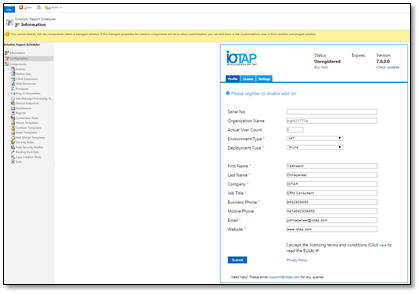
- This will register the add-on with the WORK 365 system and automatically activate the add-on in trial mode.
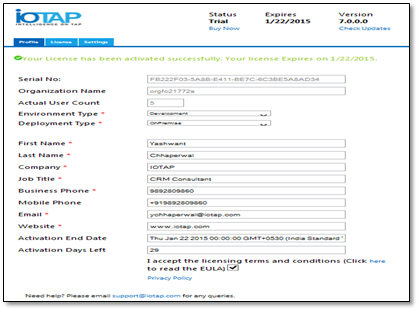
- On successful activation, you will receive a message “Your license has been activated successfully” as shown below:
- If you are unable to register then please email us at support@work365apps.com
- Registering the add-on:
- If you are copying into an existing environment please click refresh
- Refreshing License:
- Browse To Setting ➤ Solutions
- Click the solution to refresh the license.
https://www.loom.com/share/6e6a503b9cb44fbcbab6ae591d7ddd74?sid=1200fead-1ad3-4ef9-a10a-5db36025b708 - Browse to the License tab and click “Refresh License”. This will automatically connect to the WORK 365 server and get the updated license file.
- The License Tab can be accessed from the solutions. From Settings ➤ Solutions and double-click the installed add-on solution file.
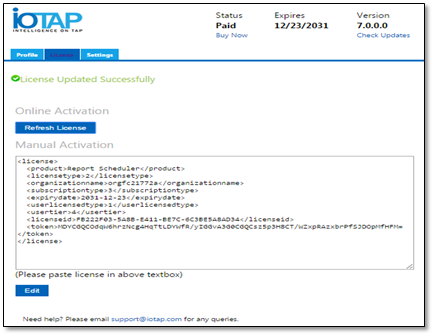
- Refreshing License: