
Applies to: Work 365 Self-Service Portal
Audience: System Administrators, Work 365 Implementers
Overview
When the Work 365 Self-Service Portal URL is modified—such as applying a custom domain or installing an SSL certificate—users may experience sign-in failures.
This issue typically results from an outdated redirect URI in the Microsoft Entra ID (formerly Azure Active Directory) app registration.
This article explains how to resolve the issue by updating the redirect URI in Entra ID.
Symptoms
Upon attempting to log in, users may see this error:
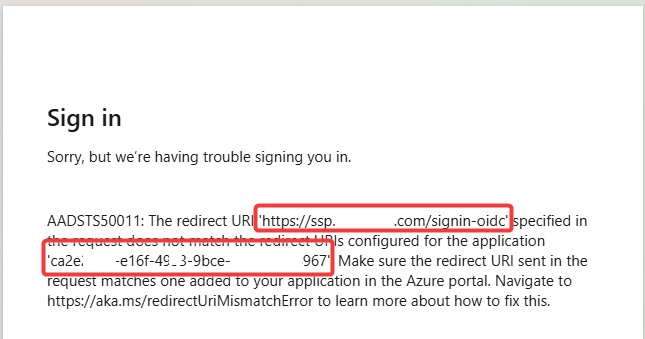
Redirect URI:
https://yourcustomportal.com/signin-oidcApplication (client) ID:
xxxxxxxx-xxxx-xxxx-xxxx-xxxxxxxxxxxx
Requirements
Microsoft Entra ID (Azure AD) Global Administrator access
Steps to Resolve
1. Capture Error Details
✅ From the sign-in error screen:
Copy the full Redirect URI
Copy the Application (client) ID
2. Sign in to the Azure Portal
Go to: https://portal.azure.com
Sign in with a Global Administrator account
3. Access Microsoft Entra ID
In the left-hand menu:
✅ Click Entra ID
If it’s not listed, select More Services and search for "Entra ID"
4. Locate the App Registration
Go to:
✅ App registrations > All applications
Search for the application using the Application (client) ID you captured
5. Update the Redirect URI
In the application record:
Click Authentication in the left-hand panel
Under Redirect URIs, click ➕ Add URI or update the existing one
- Click Save
6. Wait for Changes to Propagate
⚠️ Changes to the redirect URI can take up to 30 minutes to take effect due to Azure caching and replication.
Important Considerations
✔ The redirect URI must match exactly, including /signin-oidc
✔ Only Global Admins can edit app registration settings
✔ If multiple portals are configured, ensure each has its corresponding URI listed in the same app registration
Additional Resources
Microsoft Entra ID Documentation
Work 365 Self-Service Portal Configuration Guide